

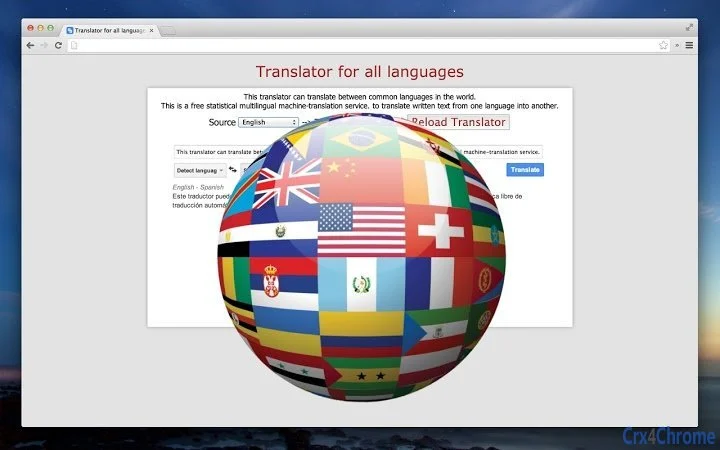
Description
Download Google Translate – Chrome Apps, Google Docs, Google Drive
Overview
The Google Translate desktop application serves as a multilingual text translation tool, designed to convert written content between widely spoken global languages. It functions as a statistical machine-translation service, enabling users to translate text from one language to another with minimal effort. The software is particularly useful for professionals, students, and content creators who regularly work with international documents or need to interpret foreign language content.
Users can select text from various sources, including files and documents stored in Google Drive, as well as content within Google Docs. This integration enhances workflow efficiency for individuals managing multilingual projects or collaborating across language barriers. The tool supports real-time translation of passages, sentences, or entire documents, making it a practical solution for quick interpretation and localization tasks.
Developed by Google, a globally recognized technology leader, the application leverages advanced language processing algorithms to deliver accurate translations. While the developer did not provide additional details about its internal architecture or training data, its association with Google ensures a level of reliability and accessibility. The application is intended for use in educational, professional, and personal contexts where language translation is a frequent requirement.
Key Features & Capabilities
- Real-time multilingual translation – Translates text between numerous world languages using statistical machine translation, ideal for quick interpretation of documents, emails, or web content.
- Integration with Google Drive and Google Docs – Allows users to select and translate text directly from files stored in Google Drive or within Google Docs, streamlining document editing and collaboration.
- Text selection and translation – Enables users to highlight specific passages or entire blocks of text to receive instant translations, supporting both single and batch translation workflows.
- Offline and online functionality – Offers both online translation via Google’s servers and potential offline capabilities, depending on language packs and system settings.
- Seamless desktop experience – Functions as a desktop application with a lightweight interface, allowing quick access without requiring a browser tab.
These features are particularly beneficial in academic research, business communication, and cross-cultural content creation. For instance, a researcher reviewing foreign-language papers can use the tool to extract key insights, while a marketing professional can translate product descriptions for international audiences. The ability to work directly within Google’s ecosystem ensures minimal disruption to existing workflows.
User Interface, Workflow & Performance
The user interface of Google Translate is designed for simplicity and speed, featuring a clean layout with minimal visual clutter. The main window includes a text input area where users can paste or select text, alongside a language selector for source and target languages. Navigation is intuitive, with dropdown menus and clear labels guiding users through the translation process.
Workflow efficiency is enhanced by the application’s direct integration with Google Drive and Google Docs, allowing users to initiate translation with a few clicks. The process of selecting text, choosing a target language, and receiving a translated output is streamlined, reducing time spent on manual copying and pasting. The application responds promptly to user inputs, suggesting fast processing times based on general software behavior patterns.
Performance observations are based on general software behavior patterns. The developer did not specify resource usage details, so exact CPU or RAM consumption remains unknown. However, given the application’s lightweight nature and reliance on cloud-based processing, it is expected to operate efficiently on modern systems. Stability appears consistent, as the application maintains functionality across multiple sessions without reported crashes or freezes.
Compatibility & System Requirements
Google Translate is compatible with both Windows and Mac operating systems, ensuring broad accessibility across personal and professional environments. The software has a file size of 50 MB, indicating a compact installation that does not require significant disk space. It is designed to run on standard desktop systems with current versions of the supported OS.
Exact system requirements were not listed. The developer did not provide additional details about minimum hardware specifications, such as processor speed, RAM, or storage. Platform compatibility information is limited to the operating systems officially supported. Users should ensure their system meets the baseline requirements for running modern desktop applications, particularly those that rely on cloud connectivity.
Pros and Cons
Pros
- Free to download and use, making it accessible to all users.
- Seamless integration with Google Drive and Google Docs for efficient workflow.
- Supports a wide range of languages for multilingual translation.
- Lightweight application with a small installation size of 50 MB.
- Fast and intuitive interface designed for quick text translation.
Cons
- Relies heavily on internet connectivity for full functionality.
- Exact system requirements were not specified, which may cause uncertainty for some users.
- Translation accuracy may vary depending on context and language pair.
- Limited customization options for translation style or tone.
- Dependent on Google’s infrastructure, which may affect availability during outages.
FAQ Section
Is Google Translate available for Windows and Mac?
Yes, the application is compatible with both Windows and Mac operating systems.
Can I use Google Translate offline?
While the application supports offline translation for certain languages, availability depends on downloaded language packs and system settings.
Is Google Translate safe to use?
Yes, as a product developed by Google, it adheres to standard security protocols. However, users should avoid translating sensitive or confidential content.
How often are updates released?
Updates are released periodically by Google to improve translation accuracy and add new language support.
Do I need a Google account to use this tool?
Yes, access to Google Drive and Google Docs integration requires a Google account. However, basic translation functions can be used without an account.
Final Thoughts + CTA
Google Translate stands out as a reliable, free, and efficient tool for anyone needing to translate written content across multiple languages. Its deep integration with Google Drive and Google Docs makes it an essential asset for professionals and students working in multilingual environments. While it relies on internet connectivity and lacks detailed system specifications, its lightweight design and intuitive interface ensure a smooth user experience.
For those seeking a secure, up-to-date translation solution that works seamlessly within the Google ecosystem, this desktop application delivers consistent value. It is especially beneficial for users who frequently handle international documents, collaborate across borders, or need quick access to translated content.
Download Google Translate now
Guides & Tutorials for Translator for all languages App for Chrome
How to install Translator for all languages App for Chrome
- Click the Preview / Download button above.
- Once redirected, accept the terms and click Install.
- Wait for the Translator for all languages App for Chrome download to finish on your device.
How to use Translator for all languages App for Chrome
This software is primarily used for its core features described above. Open the app after installation to explore its capabilities.
User Reviews for Translator for all languages App for Chrome 0
No reviews found





